How to understand podcast stats

It’s always nice to look at the numbers to see how your podcast is doing. But, podcast statistics can be confusing and complex.
Luckily, podcasting has some really good statistics - if you know how the different figures work, and how to read them.
Downloads vs streams vs plays vs listens vs views vs audience numbers
Let’s get this out of the way first.
- A download is just a download of an episode - whether it’s been played or not.
- A listen, a view, or a play, is typically when we know a human being has pressed the play button.
- A stream isn’t a thing in podcasting; if people use the word, they normally mean a “listen”, a “view”, or a “play”.
- Total audience numbers cannot be accurately worked out from downloads alone.
For a normal RSS-based podcast, no podcast really “streams”: the audio is almost always downloaded in full. In this article, we use the word “stream” to convey the action of pressing play on a podcast you’ve not downloaded yet. To a podcast hosting company, that looks the same as a download: because it technically is.
Podcasts can be automatically downloaded to your phone, in case you want to enjoy it later. Or, a podcast can be downloaded when someone wants to play it - a “user-initiated download”, or what most people mean when they say a “stream”. For an app like Apple Podcasts, Overcast or Pocket Casts - which do both automatic and user-initiated downloads - your podcast hosting company doesn’t know which it is. It just knows it’s a download.
No podcast hosting company knows whether a piece of audio or video has ever been played (a “listen”, a “view”, or a “play”). It can only ever know it’s been downloaded. (Podcast apps do know: but most don’t share that data).
Some podcasts are played using “HLS”, a method of playing a show which potentially gives more granular data to podcast hosting companies as to - for example - how much of an episode has been played.
And, of course, if an episode has had 2,000 downloads, that doesn’t mean it has 2,000 people playing it. Automated downloads mean a podcast may be downloaded, but never played. Or it might have been downloaded twice by someone.
Where to get your stats
There are three places to find stats about your podcast.
Your podcast host (eg Buzzsprout, RSS.
A third-party prefix or logfile service (eg OP3, Triton Podcast Metrics, Podtrac, Podscribe). These may offer data that is more comparable to other podcasts.
A podcast app platform (eg Apple Podcasts Connect, Spotify for Creators, YouTube Studio). Podcast apps know more data about consumption - on their platform - than anyone else.
What standards are there?
The IAB
The IAB, working with the industry, set some guidelines as to what a download is, and how to calculate total audience. Chances are that your podcast host, or a third-party service, will produce numbers using these guidelines.
The IAB claims repeatedly that it measures “listeners”. It doesn’t. It measures devices - for example, an iPhone, running Apple Podcasts, connected to a specific IP address.
Apple Podcasts, Spotify and YouTube do not provide numbers that are calculated using the IAB guidelines.
The Alliance for Podcast Measurement (AMP)
AMP is an industry group which has also set some definitions as to what a play is, and how to calculate total podcast audience.
The definitions currently only exist as a press release; there is no technical definition of how to calculate a play (those are coming in July 2026).
However, at a cursory glance, it appears that Spotify and YouTube may calculate their “play” numbers (YouTube calls it a “view”) in a similar fashion to AMP’s definitions.
Apple Podcasts does not provide numbers that are calculated using AMP’s definitions.
Your podcast host’s statistics
Your podcast host probably offers statistics about downloads.
Be aware of the following:
All podcast hosts measure downloads differently. Ones using the guidelines (they may describe themselves as “IAB v2 compliant” or “IAB Certified”) are roughly comparable: but even these podcast hosts do not have identical measurement mechanisms. Ones that don’t use the guidelines, most notably Soundcloud, may appear to give you four or five times the amount of downloads. These services don’t really give you more downloads - they’re just counting them differently. When switching hosts, you won’t get the same numbers: they may go up or down. For more on this, read this story about Jimmy and the magic pizza shop, which helps explain more about IAB certification through the medium of pizza. Ausha has also posted a helpful infographic on the standards.
YouTube, Spotify, sometimes Amazon Alexa devices, and some other platforms may cache your podcast (they may take a copy and host it on their servers). Your podcast host may not see individual plays on these services. Make sure these numbers aren’t elsewhere on your podcast host’s dashboard, or hidden altogether.
Playback of podcasts delivered via HLS - as used in Apple Podcasts if you’re enabled for video, as one example - works in a different way to a file download. However, downloads of podcasts using HLS are also possible, so the data doesn’t necessarily mean it’s been played.
Your podcast host’s numbers are produced by your podcast hosting company. It may use these numbers to help bill you. It is certainly incentivised to keep you as a customer. It is always worthwhile to give yourself comparable numbers from elsewhere; marking your own homework isn’t always a good plan.
Statistics from a third-party prefix or logfile service
There are a number of companies that will give you analytics for your podcast, without requiring you to switch hosts. These services offer an independent view of your numbers; and often allow advertisers, or anyone, to view your numbers too.
A prefix service - like OP3, Magellan AI or Podtrac - works by counting the number of requests for your audio files. They do not measure full delivery of that audio. You typically use these services by adding a “prefix” to your podcast audio file addresses at your podcast hosting company. Almost all podcast hosting companies let you set this; you might need to email the support team if you don’t see them.
These services are mainly offered for free. OP3 is entirely open - both the code that runs it, and the data itself - and Podnews is one of its supporters keeping it running.
You can use more than one prefix service; and you can technically use prefix services for HLS podcasts too, but check directly with the provider before you do that.
A logfile service - like Triton Podcast Metrics - analyses the logfiles of the audio servers that host your podcast to work out how many downloads it got. This is more likely to measure full delivery of the audio, since logfiles include how much data was transferred (data unavailable to a prefix service).
Rankers can compare shows: each of these tools measure requests for downloads in a consistent way within its service. Because these numbers are comparable, some - like Podtrac or Triton Digital - also produce a ranker, showing some of the largest shows. However, a ranker produced like this will always only contain podcasts that use the service, and will not be a complete view. (Podtrac also produces estimated country rankers outside the US with opaque calculation methodology).
Ads can also be used for measurement: some advertising attribution services, like Podscribe for example, are able to measure how many times their customer’s ads were inserted into shows and therefore estimate total downloads.
OP3's open data means you can see specific show data - our stats are available here - and our sister publication Podcast Business Journal carries a list of shows who are measured by OP3, allowing you to compare your figures with theirs.
Statistics from podcast app platforms
You can measure everything in a podcast app - every button press, every touch of the screen, and check sensors on your device to know where you are and what you’re doing. It’s for this reason that podcast app platforms have the most detailed statistics for your podcast. However, podcast app platforms only measure their own platform. Data you’ll find in, say, Apple Podcasts Connect, will only reflect consumption on Apple Podcasts: nowhere else.
Here are the three biggest podcast app platforms, and the data each gives.
Apple Podcasts Connect analytics
You can see analytics for your podcasts on Apple (only) by logging into Apple Podcasts Connect. Apple is responsible for 40% of all podcast downloads on average.
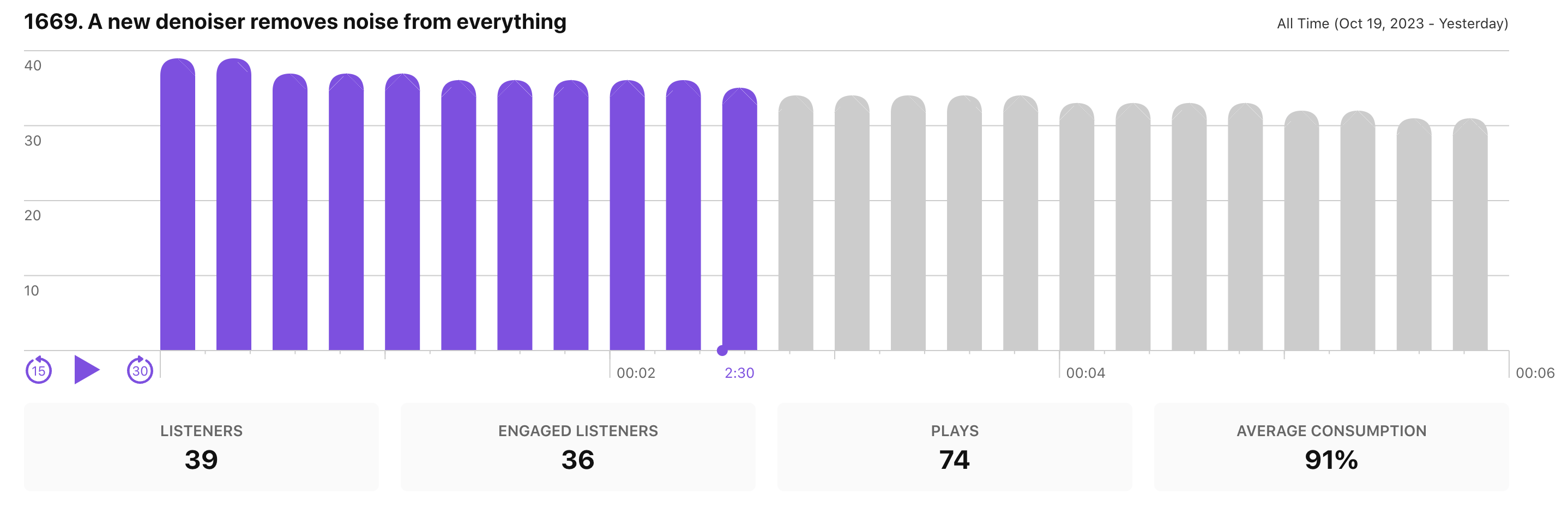
Here, Apple Podcasts is showing you how many people kept playing all the way through. This podcast saw a drop between 2'10" and 2'30" - was this because the content there made people turn it off?
Apple Podcast Analytics also only reports plays, not downloads. They know when people hit the play button, irrespective of whether it was automatically downloaded - and how long they keep playing it.
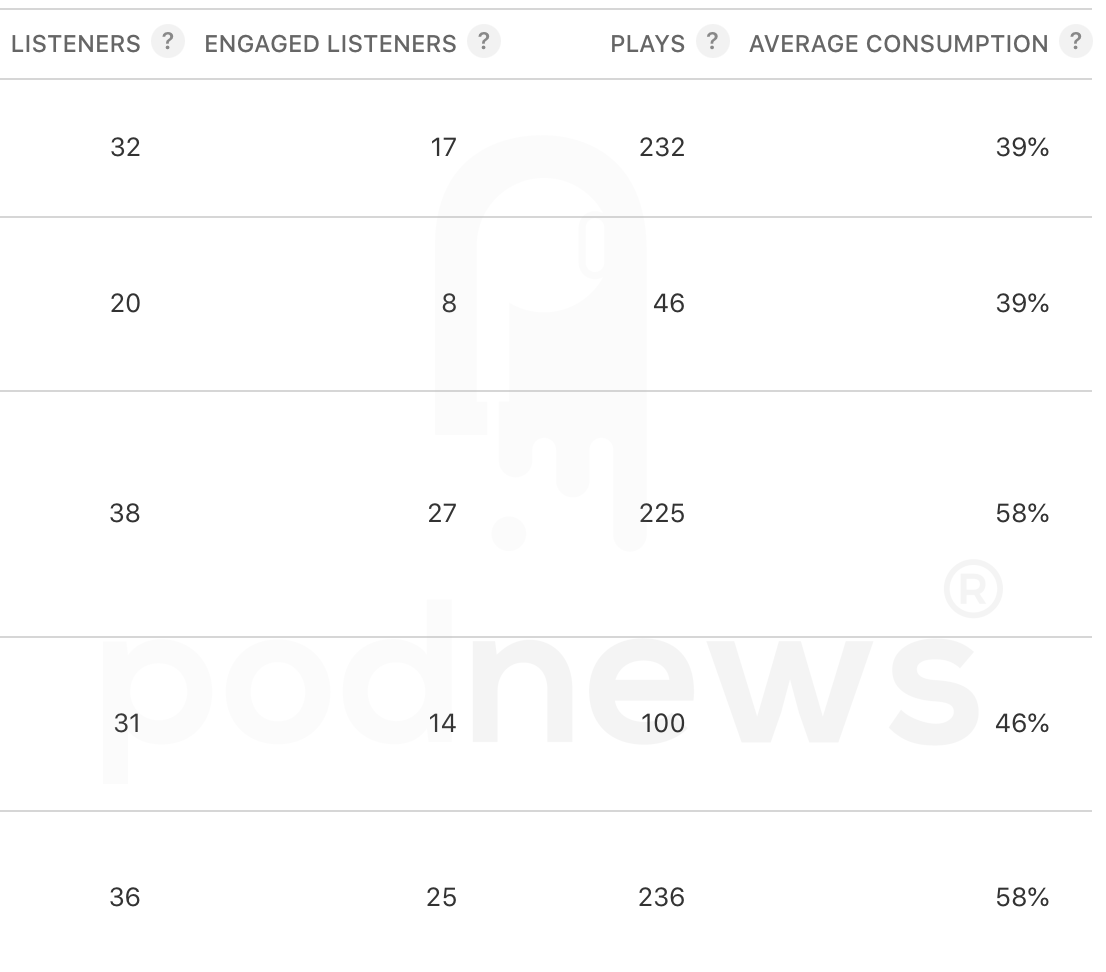
Caution: As above, you’ll see a large number of “plays” in Apple Podcasts. Possibly too large a number - if we only have an audience of 32 in the top episode listed here, why did we get 232 plays? Apple defines a “play” as “The number of plays on unique devices where the play duration is greater than 0 seconds.” - but Bumper tells us that a “play” is literally any tap of the play button, including including taps related to pausing/unpausing an episode. The “total audience” metric here - “the number of unique devices that have played more than 0 seconds of an episode” - is rather more useful.
Apple Podcasts Analytics measures all playback in the Apple Podcasts app, and on Homepod - whether it’s video or audio (and no, you can’t tell from these figures). It doesn’t measure any embedded Apple Podcasts players; and it doesn’t measure playback on the web.
Apple Podcasts Analytics only report a sample of your audience. They are a useful tool to help you understand how people are consuming your podcast. They do not give you the total download numbers for your podcast, and will always be different to your podcast host.
Spotify for Creators analytics
You can see statistics for your podcast by logging into Spotify for Creators. If you’re not hosted with Spotify, this will only give statistics from the Spotify app. (If you are hosted with Spotify, this shows consumption everywhere).
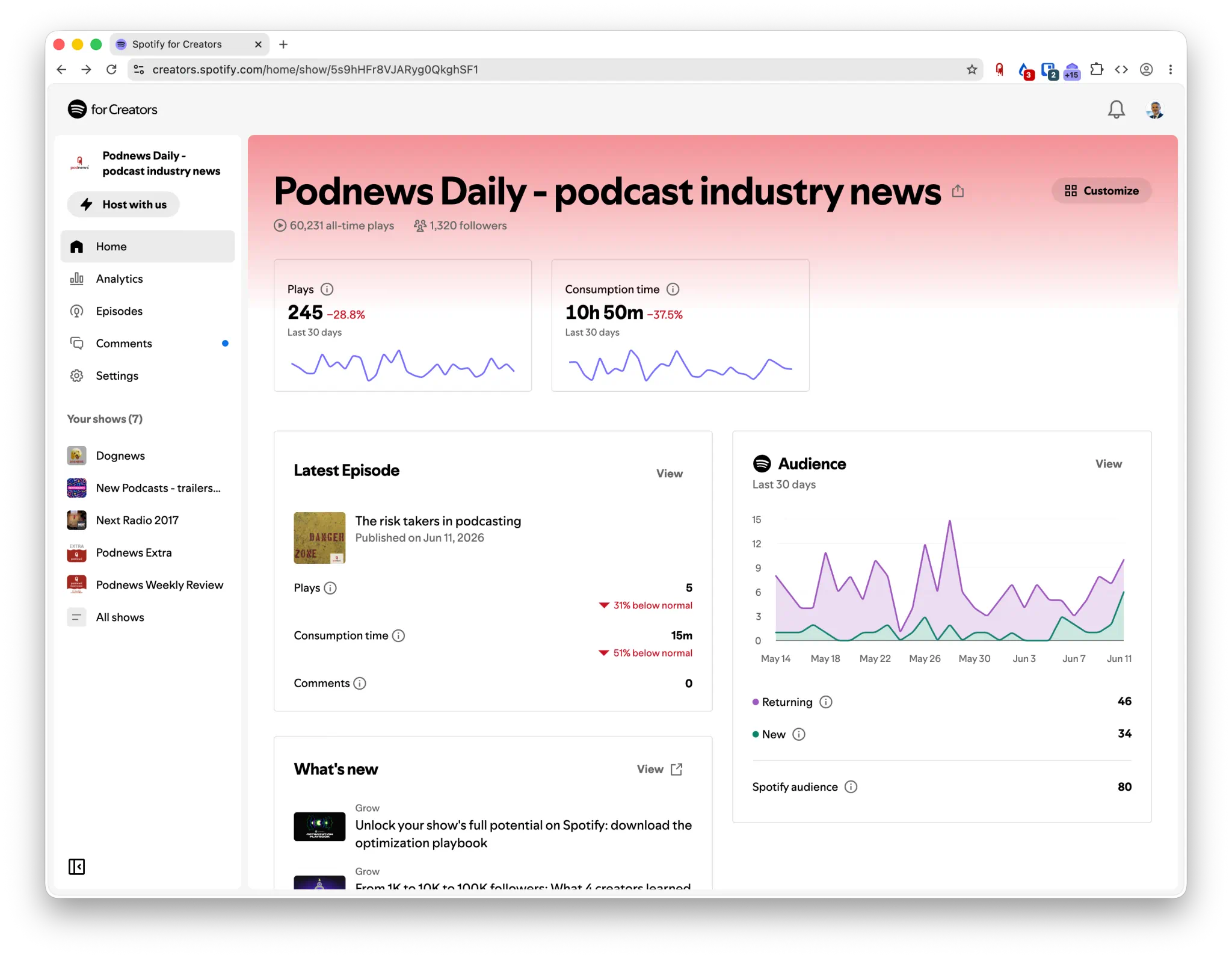
Spotify does not measure downloads, but, instead, “plays”. A “play” in Spotify was changed in June 2026, to count:
each time someone watches or listens to an episode for at least 30 seconds
Under the audience tab, Spotify gives useful information about your audience’s demographic information - gender and age. Remember that Spotify, itself, attracts a certain demographic. It also tells you whether your audience are returning, or new.
The discovery tab shows how people found you - and how enticed they were to play your show. You might be able to change the figures by focusing on your thumbnail or your episode title. And, the engagement tab shows you your top episodes, total consumption time over the past 30 days or so, and episode completion rates.
Caution: Unlike the IAB guidelines, “plays” are not de-duplicated by audience. If you play the first half of Joe Rogan in the morning, and the second half in the afternoon, you’ll count as two “plays”, but one IAB download (even if you download the file twice to do so). So “streams” won’t be anywhere near same as your podcast hosting company says for downloads.
Spotify’s definition of total audience is also different to the IAB definition: because it’s always de-duplicated across the entire podcast, forever. Consume the same episode every day for 60 days? You’re “1” person, says Spotify - because you’re logged-in to Spotify, so they know. The IAB guidelines, however, use a device’s IP address, user-agent and a 24-hour rolling window for duplicates: so you could be “60” people according to the IAB’s guidelines. In short, this number won’t match what your podcast hosting company says either.
In both cases, the important bit is the trend. If your numbers go up 25% in Spotify, they should go up about 25% in your podcast platform too.
YouTube Studio analytics
YouTube Studio offers a variety of detailed statistics for your podcast. It’s here that you’ll get some of the most detailed stats for your show - with the caveat that it is, of course, only relevant for your plays on YouTube.
As with Spotify, a “play” isn’t defined anywhere, and YouTube has never told us how it works. Most experts generally agree that it’s a minimum of 30" of playback - different from the IAB guidelines.
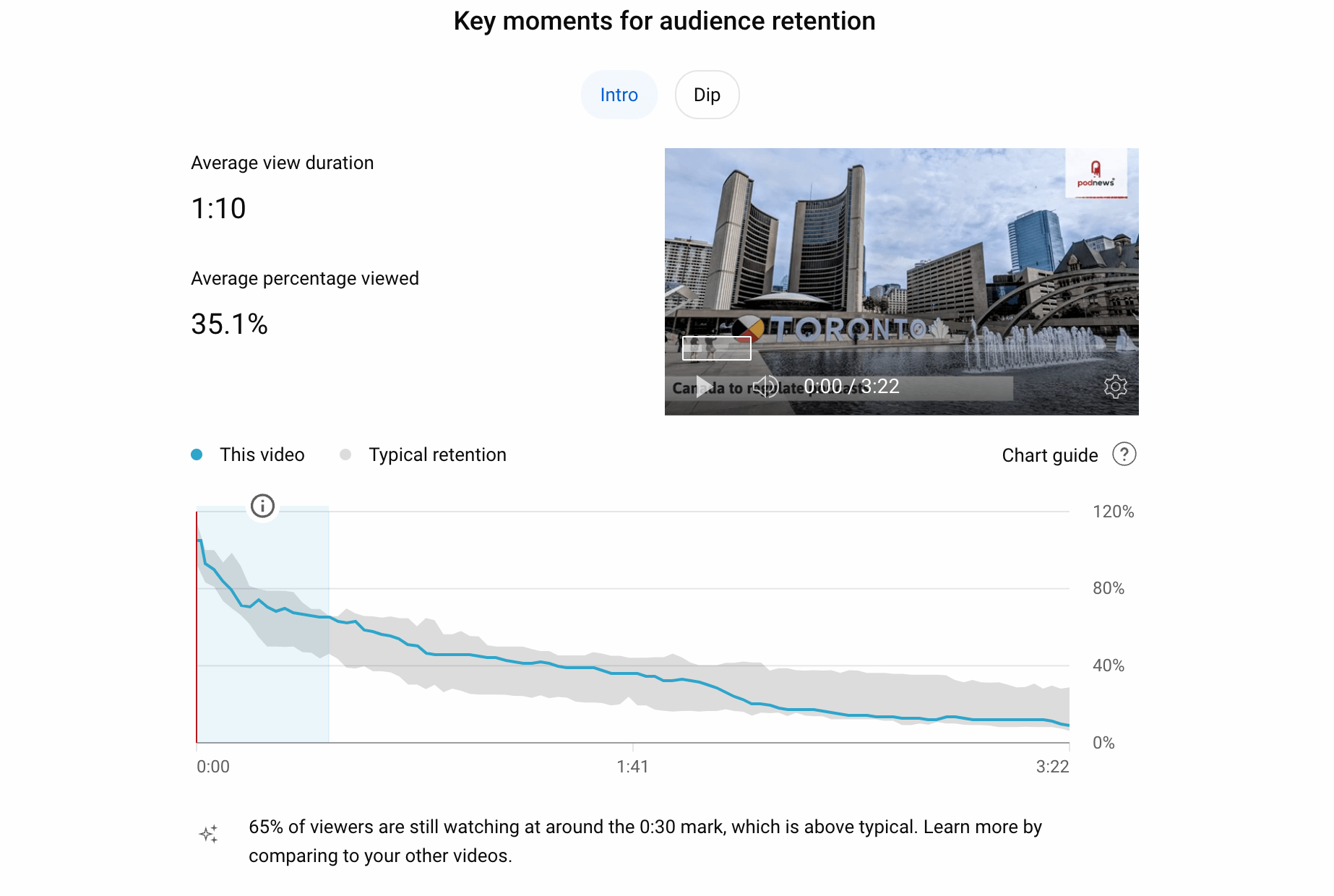
Here, YouTube tells you when you lost audience, but also compares it to your other videos. Clicking “Dip” above will highlight where you lost the most audience.
You can see how many people watched with the subtitles on; how viewers found the video; and even realtime data on how it’s working.
“Advanced Mode” (found in the top right of the analytics section) allows you to grab more data. In there, under the “more” dropdown, you’ll find “YouTube Product”, which looks like this:
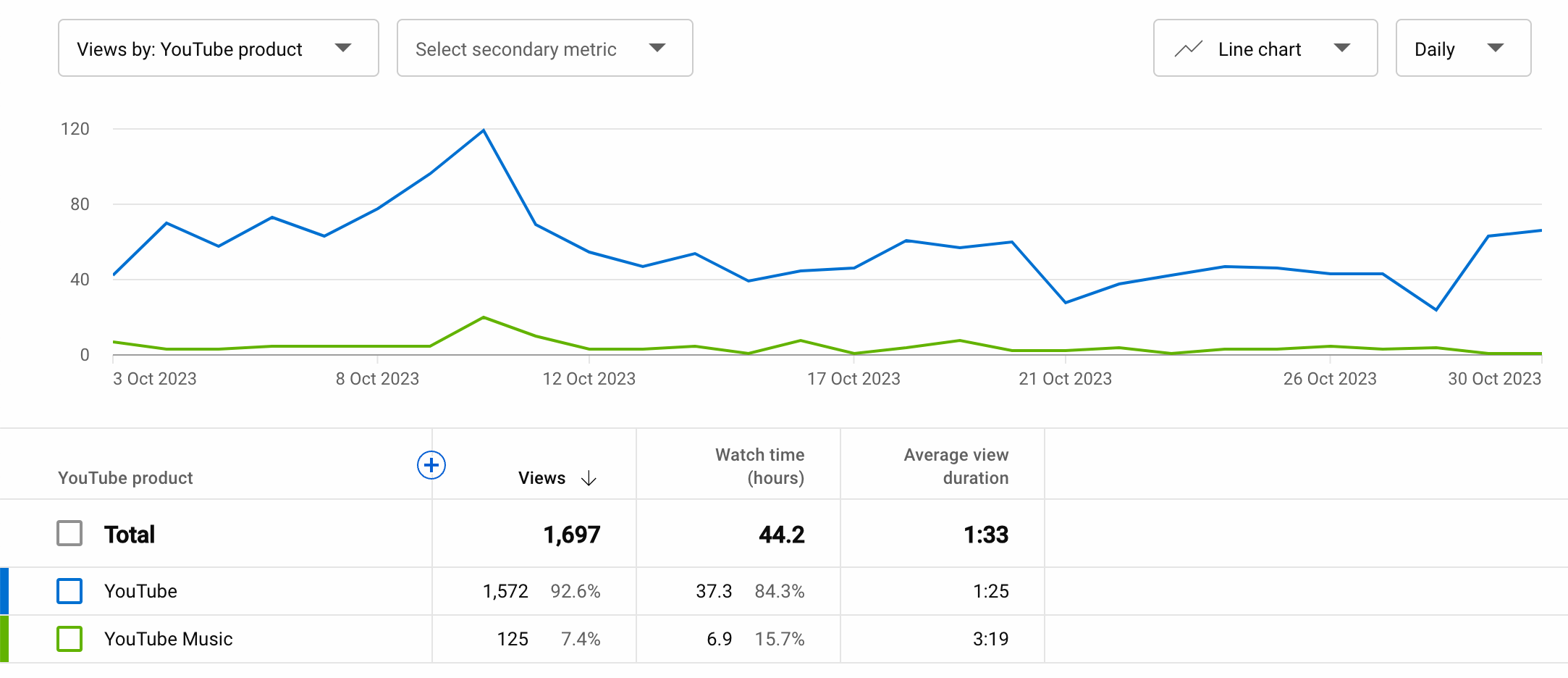
This data helps you understand where your audience are consuming your podcast. For us, people using YouTube Music appear to listen twice as long, for example, as in YouTube itself - so perhaps that suggests we should promote YouTube Music as the main destination.
Thanks to the large number of YouTube creators, are no shortage of YouTube analytics videos to help you understand these statistics more.
- The YouTube Music app will let you listen to any podcast via its RSS feed. This consumption, however, does not appear in YouTube Studio analytics.
Comparing different platforms is hard
Some podcast apps download a podcast automatically, like Apple or Overcast; others only download it when you press the play button (a “user-initiated download”, often incorrectly described as “streaming”). Some may even download little chunks of it (Apple Podcasts works this way when your show is enabled for video).
You could argue that a play within Spotify, which normally only “streams” a podcast on-demand, is more valuable than an automated and speculative download from Apple Podcasts or Overcast. In a blog post, Simplecast compares different podcast app behaviour.
While Apple Podcasts stops downloading podcasts you don’t play, many other podcast apps just keep on downloading them, forever, particularly Overcast. This will have the effect of making their figures appear bigger.
Apple has explained how automatic downloads work on its platform: and when the app stops downloading. It quietly changed how they work in 2023 - to great consternation in the industry, who saw significant surprise changes.
Companies that estimate analytics
Podkite, Podchaser, Podscribe, Listen Notes and some others claim to show podcast analytics, and even total download numbers.
Some of these services take some data from some podcast apps. Some use metrics from their customer’s ads in those shows. They also use data from your show’s activity on social media, and Google’s search, to produce their estimates. Some have full data for some podcasts, and use those as a benchmark to help estimate others.
However, unless these companies are directly built into your RSS feed or you’ve given them access to your hosting account, they do not know podcast download numbers.
Comparing your data to others
Buzzsprout, one of the largest podcast hosting companies, maintains stats for its platform. Some of the most useful data here is at the bottom - showing average episode downloads and durations.
In May 2026, this data told us that the average podcast gets just 28 downloads in the first month after publishing. We reckon you’re doing better than half the podcasts out there. Congratulations.
How many podcasts are downloaded but never played?
About 13% of podcast downloads are never played.
Here’s how we know: in June and July 2021, some versions of the Apple Podcasts app had a bug, which resulted in it not auto-downloading audio. Users mostly didn’t notice, because when they hit the play button, the app downloaded the audio anyway.
This bug caused a significant decrease in some reported numbers. Podtrac reported a 31% decrease in downloads from Apple Podcasts in July. Other podcast hosts reported similar numbers.
Since playback was unaffected in Apple Podcasts, and since the loss of automated downloads meant 31% fewer downloads overall, it’s therefore fair to suggest that 31% of automated downloads on Apple Podcasts are never played.
The market share for Apple Podcasts is about 40% of all podcast downloads on average. If almost a third of those downloads are never played, that would suggest that the real market share for Apple Podcasts, for plays as opposed to downloads, is only 27%.
That may mean if a podcast episode has had 2,000 downloads, we can estimate 260 (13% of them) have never been played.
Most other podcast apps don’t default to auto-downloading (and for Spotify, you can’t auto-download a show anyway). So, different apps do things differently. But, 32% of respondents to this UK survey say they play half their downloaded episodes or fewer.
The Apple bug was in the summer for most people, when podcast playback does slightly decline: it could be that it’s unrepresentative. Just because they weren’t played within a month doesn’t mean they were never played at all, you could argue. And Apple has changed their download behaviour a little since 2021. Even so, we think 13% is about right.
What’s the most downloaded podcast in the world?
There’s no easy way to find out.
The Apple Podcast “Top Shows” charts doesn’t measure downloads - and nor does YouTube’s new podcast chart.
We have a full article all about how the podcast charts are calculated.
What’s the podcast with the biggest audience?
The equivalent of “cume”, “reach” or “readership” - how many people follow a specific show - isn’t available to podcasters.
Most podcast apps work by checking your RSS feed on a central server, and then tell your audience’s phone when they spot a new episode. All a podcast hosting company sees is that central server connecting: so, there isn’t an easy way for it to know how much audience your podcast has.
Some hosts or services will use IAB guidelines to measure a device’s IP address and its user agent to estimate a total number of 'users’. This may significantly over-estimate audiences: as one example: someone on a laptop on their home wifi, who then travels to work playing a podcast via a cellular phone, and while at work connects to wifi in the office on their desktop, may appear as three separate people. Or it may significantly under-estimate audiences: thirty iPhone users in an office, connected to the same (IPv4) wifi and downloading the same podcast episode in Apple Podcasts, will appear to your podcast host as one person downloading the same show multiple times: the useragent and IP address will be identical. This is a particular problem in large offices for shows released during the day: especially those with company phones. Even some cellular providers have large numbers of users sharing the same IP address.
Apple Podcasts, Spotify and YouTube give follower numbers for signed-in users. None of these give you a total number of consumers of a podcast: just for their own service.
Podcast measurement vs radio measurement
You might hear some people compare podcast measurement with radio measurement. Here are the differences:
- Radio is measured by recruiting a sample of listeners, monitoring what they listen to (electronically or via a paper logbook), and then multiplying this number up to produce total audience figures. This is normally a statistically valid process (and station figures are relatively stable, which underlines this). However, sample sizes and the research process can cause unpredictable figures. Radio measurement isn’t, therefore, perfect.
- Podcasts do not use samples, and are typically measured by actual total downloads. However, total downloads aren’t the same as total plays. Podcast measurement isn’t, therefore, perfect.
- Radio research uses demographic information from the sample of listeners, so they’re able to claim certain stations do better with female listeners, or a 15-34 audience, or so on. This helps advertisers know where to advertise. Small sample sizes may make this unreliable, though - in particular, it’s hard to get young men to take part in these types of surveys, so they’re often under-represented in the results.
- Podcasts can use IP addresses and other data to give some geographical data - but there’s no demographic research at all without other data. Some podcasters use surveys, which are often made up of super-fans of the podcast, a self-selecting group which is potentially unrepresentative of the total podcast audience. Other podcasters use “household graph” companies which combine different tracking of all the traffic coming from an IP address to work out if a household contains a 30 year-old housewife, for example. This is inevitably less accurate than just asking podcast fans.
In short, therefore, all research is flawed (though some research is more flawed than others). Be cautious about comparisons.